Most LinkedIn outreach looks the same. A connection request with a generic note. A follow-up that says "just wanted to bump this." A pitch that lists three features and ends with "would love to connect."
It does not work because it is indistinguishable from everyone else doing the same thing. The top 1% of LinkedIn outreach is not better because the senders are more talented. It is better because they operate from a different system.
Here is what that system looks like.
What the Data Shows
The patterns below come from analyzing millions of LinkedIn interactions across top-performing outbound campaigns. The numbers are directional your results will vary by ICP and offer but the relative effect of each lever is consistent.
The biggest lever, by far, is personalization. Not adding the prospect's name and company. Using something specific they did, said, or announced as the entry point.
The second biggest is using a three-step sequence instead of a single message. Most people either blast one message or run six identical follow-ups. Neither works. Three deliberate touches, each structured differently, is the sweet spot.
Pattern 1: Target Who Is in Motion, Not Just Who Fits
The top 1% do not build static ICP lists. They build dynamic lists based on behavioral signals: evidence that a company is actively in motion right now.
A company hiring for a VP of Sales is signaling an active investment in revenue. A founder posting about pipeline challenges is signaling a live problem. A company that just raised a Series A is in a 90-day window of maximum buying intent.
These signals are the entry point. ICP criteria filter who is worth contacting. Signals determine when.
The five signals we track for every LinkedIn campaign:
- LinkedIn post activity: founders and sales leaders posting about the problem we solve
- Job postings: SDR, BDR, Head of Outbound, Revenue Operations titles
- Funding announcements: Series A through C is the window of highest GTM investment
- Executive job changes: new decision-makers in their first 90 days are open to vendors
- Company growth signals: headcount growth above 20% in the past year
We pull these signals with Apify (for LinkedIn posts) and Serper for web signals. The accounts that hit two or more signals simultaneously go to the top of the list. For the full breakdown, see The Buying Signals We Actually Track.
Filtering to 50 accounts with strong signals consistently outperforms blasting 500 accounts built from static criteria. Every time we pushed volume, reply rates dropped. Every time we tightened the filter, they went up.
Pattern 2: Warm the Connection Before You Request It
Warmed connection requests get 30.2% higher acceptance than cold ones.
The top 1% do not cold-fire requests. They create context first. Three steps, in order:
→ View the profile. LinkedIn notifies the prospect. You are on their radar before you ask for anything.
→ Engage with a recent post only if there is one worth engaging with. A genuine comment, not a like-and-move-on. Do not force it if the content is not there.
→ Send the connection request 24-48 hours later. By the time it arrives, you are not a stranger. You are someone who has been paying attention.
HeyReach runs this automatically. Set the campaign flow to view a profile before triggering the connection request step. For accounts with a strong signal, add the engagement step before the request goes out.
Warmed sequences run above 40% acceptance. Cold requests with no pre-engagement average 25-30%.
Pattern 3: Keep Messages Under 150 Characters
Messages under 150 characters get 22% more replies on average.
Cut every adjective. Cut every feature claim. Cut every sentence that could apply to anyone else on the list.
What stays: one specific reference, one line about what you do, one low-friction ask.
→ Too long: "Hi [Name], I came across your profile and was really impressed by your work at Acme. I help B2B companies like yours increase pipeline through AI-powered outbound. Would love to grab 15-30 minutes to share how we've helped similar companies. Let me know if you're open to a quick call?"
→ Right length: "Saw your post about building out the SDR team at Acme. We help Series B companies build the outbound infrastructure before the first hire. Worth a quick conversation?"
The second message is 147 characters. It does not explain the product, list features, or make promises. It opens a door.
One message is a coin flip. A short message is a conversation starter. A long message is a pitch deck nobody asked for.
Pattern 4: Use 3-Touch Sequences, Not 6
The research is consistent: three follow-up touches after the first message is the optimum. More than that, and you are training prospects to ignore you. Fewer than that, and you are leaving easy conversions on the table.
Each touch must be structurally different and add something new:
Touch 1 (Day 0): The signal-referenced opener. Specific to what you found in signal research. Short. Ends with a single low-friction ask.
Touch 2 (Day 3): The value add. A new angle, a piece of content, a relevant case study. Never a restatement of the first message. Frame it as useful regardless of whether they respond.
Touch 3 (Day 10): The close. A permission close that gives them an easy out while leaving the door open. "If the timing is off, no problem happy to reconnect when it makes more sense." People respond to this when they did not respond to the first two because it removes the pressure.
For the full framework on follow-up sequencing, see The 3-Follow-Up Sequence That Doesn't Feel Like Chasing.
Pattern 5: Personalize to What They Did, Not Who They Are
Personalization is the single biggest lever in LinkedIn outreach a 54.7% lift in reply rate.
But personalization does not mean adding their name and company to a template. That is mail merge. What works is using something they did, said, or announced.
→ Weak: "I see you're Head of Sales at Acme." → Strong: "Saw you posted about rebuilding your outbound motion last week."
→ Weak: "Congrats on your 3 years at [Company]." → Strong: "Noticed Acme just posted 4 SDR roles looks like you're scaling the team."
→ Weak: "I came across your profile and thought we might be a fit." → Strong: "Saw the news about Acme's Series A congrats on the raise."
Activity references demonstrate that you paid attention to something real and specific. They cannot be generated from a template. When done right, they feel like a message from someone who actually looked.
We use Apify to pull recent LinkedIn posts and Clay to generate first-line openers from that context. For accounts with no strong LinkedIn activity, the signal itself becomes the reference a job posting, a funding announcement, a web mention.
Pattern 6: Write Like a Peer, Not a Vendor
Conversational tone drives 27.1% more replies than vendor-style copy.
Vendor framing puts the recipient in a buying posture. They start evaluating whether they need your product. Peer framing puts them in a conversation posture. They respond like they would to a colleague.
→ Vendor: "I help B2B companies improve outbound ROI by 3x through our AI-powered platform." → Peer: "We've been running signal-triggered outreach for a few clients and the reply rates have been interesting. Thought this might be relevant to what you're building."
The rules:
- Never explain what your product does in message 1
- Never use "I help companies like yours"
- Never ask for 15-30 minutes before they know why it is worth it
- Write like you are sharing something useful, not pitching something expensive
The difference is not the offer. It is the power dynamic implied by the language.
The Stack That Runs This at Scale
Running these patterns at scale requires infrastructure, not effort. The stack:
Each tool handles one layer. The automation connects them.
The Pipeline: From SalesNav Search to Active Campaign
The most time-consuming part of LinkedIn outreach, done manually, is the list-to-campaign handoff. Sales Navigator is the targeting layer. HeyReach runs the sequences. The gap between them where most people lose hours can be closed in one step.
Set your ICP filters: title, seniority, company size, geography, industry. Add any signal-based filters you can apply inside SalesNav companies that have grown headcount recently, leads that have changed jobs in the last 90 days. Copy the search URL. This step is manual by necessity: LinkedIn Sales Navigator does not have a public API, so there is no way to build or trigger searches programmatically. Everyone running SalesNav-sourced outreach has this same manual step.
HeyReach accepts a Sales Navigator search URL as a list source. Paste the URL and HeyReach pulls the leads directly, no CSV download or upload needed. This is the step that removes the manual handoff entirely.
Before the campaign starts, run signal research on the imported accounts. Apify pulls recent LinkedIn posts for any lead with relevant activity in the last 30 days. That output feeds the first-line personalization column in your message templates. If you want deeper enrichment verified email, company data, Clay-generated first lines export the contact list from HeyReach as a CSV, run it through Clay, and use the enriched variables back in your HeyReach sequence templates. The list is already built; Clay just adds the personalization layer on top.
HeyReach handles the full sequence: profile view, connection request, then the three-message follow-up cadence. Each step runs on the configured schedule. One human checkpoint: review the lead list and approve before the first touch goes out.
Every reply across all active campaigns flows through the reply handler. Each response is classified, the lead profile is enriched with current context, and a draft is queued for review. Nothing sends without approval.
The SalesNav URL import is the leverage point in this pipeline. Removing the CSV step also removes the point where list quality degrades leads do not get dropped, re-sorted, or duplicate-duplicated from spreadsheet handling. The list that HeyReach imports is the list SalesNav built.
Two Campaigns, Two Approaches
Here is what these patterns actually produce. Two live campaigns, both running through HeyReach, both targeting B2B buyers built from completely different list sources.
Campaign 1: Signal-Based Hot Leads
The list for this campaign is not built from a database. A script scrapes LinkedIn posts with high engagement on specific topics outbound, pipeline, GTM and surfaces the people actively engaging with that content. These are not cold accounts. They are people who have already raised their hand on the exact problem we solve.
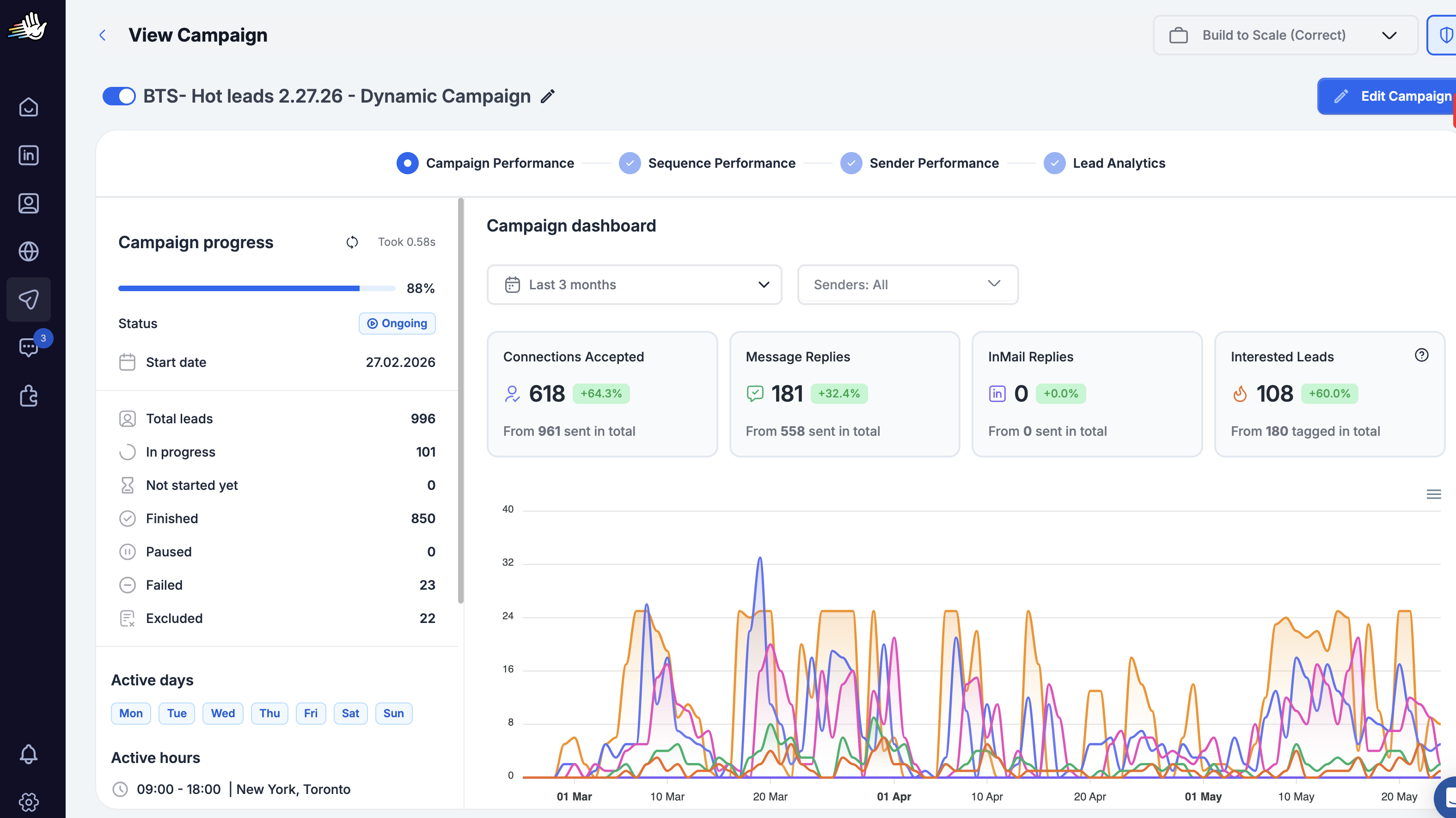
996 total leads. 618 connections accepted from 961 sent. 181 message replies from 558 sent. Running for 3 months.
The acceptance rate is more than double the LinkedIn average because the targeting starts with intent, not just fit. Every person on this list has recently engaged with content about outbound. The connection request does not feel random to them it lands in a context they created themselves.
Campaign 2: Apollo-Sourced Founder List
The second campaign targets AI SaaS founders and B2B startup teams of one to ten people. The list was built in Apollo using company size, industry, and title filters. No signal layer these are ICP-qualified accounts, not signal-qualified ones.
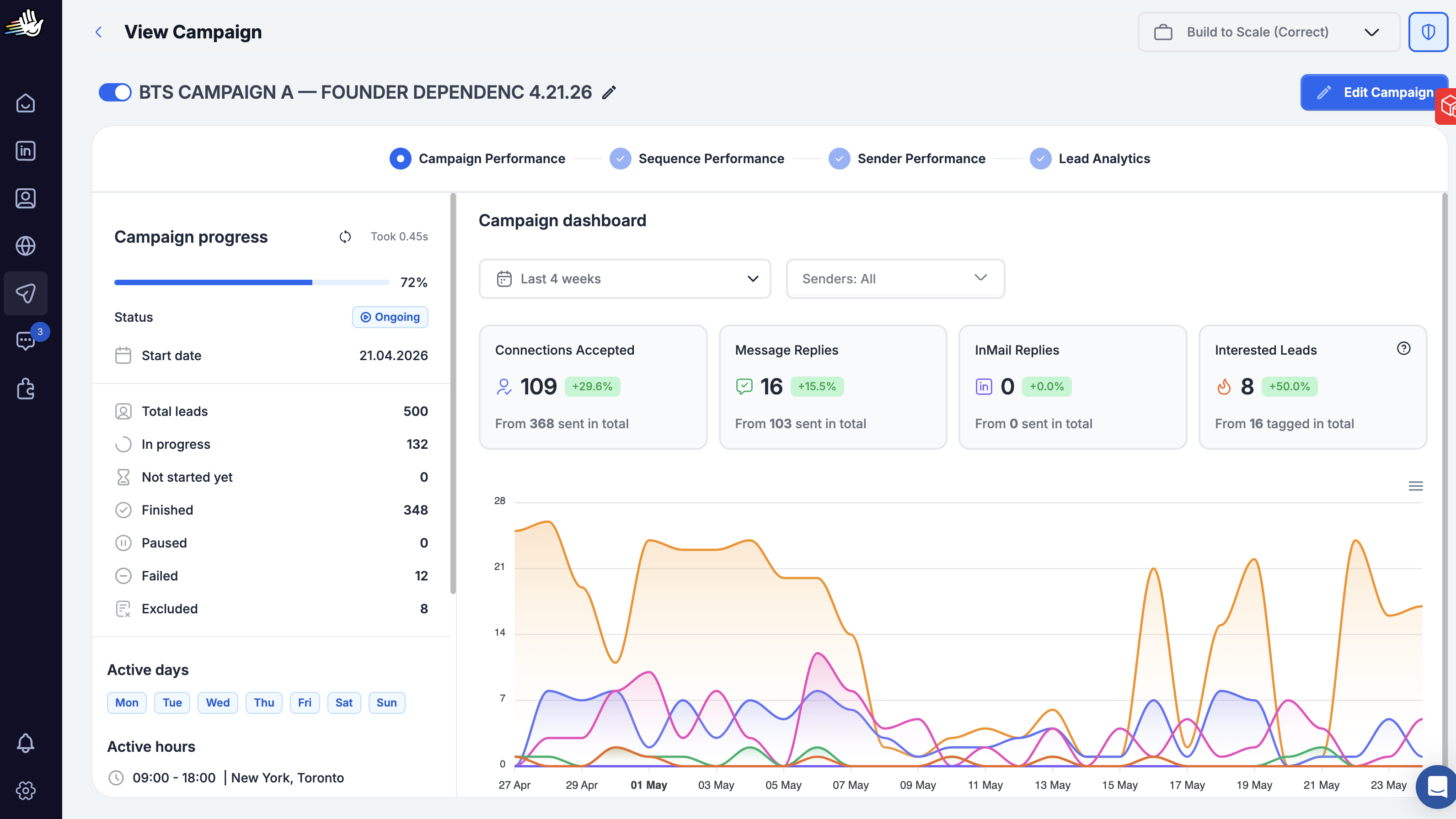
500 total leads. 109 accepted from 368 sent. 16 replies from 103 sent. Running for 4 weeks.
Solid numbers. The acceptance and reply rates are above average for cold LinkedIn outreach. But compare them to the signal-based campaign and the gap is clear: 64% vs 30% on acceptance, 32% vs 16% on replies. Same sequencing system, same messaging approach, same sender. The only difference is how the list was built.
The signal-based campaign does not outperform the Apollo campaign because the messages are better. It outperforms because the people receiving them are already in motion. Targeting is the highest-leverage variable in LinkedIn outreach more than copy, more than sequence length, more than timing.
What Does Not Work Anymore
A few things that used to move the needle and no longer do:
Heavily formatted templates. AI generation has trained people to recognize the "I noticed you [X]" pattern. The framing is overused. Signal references need to be specific enough that they could not have been generated from a template.
Pitching in the first message. Acceptance rates drop when the connection note contains an offer. Send the request, establish the connection, then open the conversation. The sales pitch belongs in the follow-up sequence, not the knock on the door.
Long follow-ups that summarize the first message. The second touch should add something genuinely new. A different angle, a case study, a piece of content. If the only thing you can say is "following up on my last message," you are out of material and should close the thread.
Frequently Asked Questions
Do connection notes help or hurt acceptance rates? It depends on the note. Generic notes perform at or below blank requests. Signal-referenced notes that demonstrate specific attention perform above blank requests. The rule: if you cannot say something specific to this person, leave the note blank.
How many connections should we send per day per account? HeyReach's safe range is 15-20 connection requests per day per LinkedIn account, with built-in randomization on timing. Pushing above 25 per day consistently triggers LinkedIn rate flags. We stay at 15 per account per day across all active campaigns.
What is the right follow-up timing? Touch 2 goes out three days after the connection is accepted, not three days after the request. Touch 3 goes out seven to ten days after touch 2. Do not follow up before a connection is accepted.
Is multi-channel LinkedIn plus email worth it? The data shows a 13.8% lift from adding email follow-ups after LinkedIn. Whether it is worth it depends on whether your ICP is reachable on email and whether you have verified contacts. For clients where we have both LinkedIn and verified email, we run coordinated sequences with LinkedIn as the primary and email as a supporting touch 5-7 days in.
How do you handle prospects who accept but never reply? They go through the three-message sequence in full. If there is no response after all three touches, the thread closes. No additional messages. If they engage with content, post, or interact with the company page in the following 90 days, they re-enter the list as a warm account in the next cycle.
The system is straightforward. The gap between knowing it and running it reliably is the infrastructure.
If you want to see how we would build this for your outbound program, book a call.